




Top 10 Free Productivity Apps That Are Actually Useful in 2026
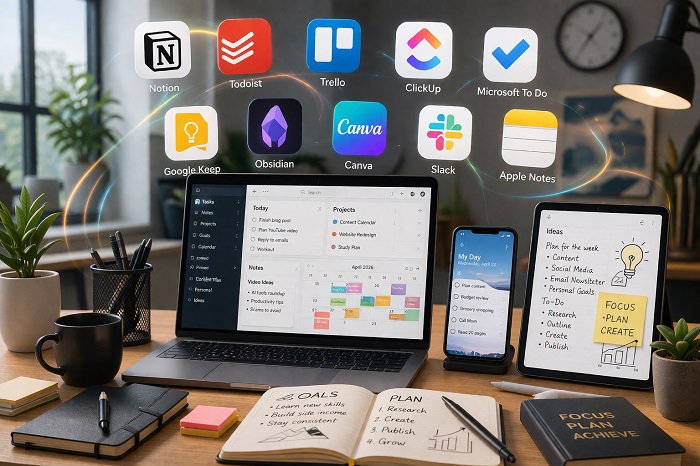

In 2026, the best free productivity apps are not the ones with the biggest marketing budgets. They are the ones that genuinely help you plan your day, manage tasks, capture notes, collaborate smoothly, and reduce friction without forcing an upgrade after a few hours of use. A truly useful free app should be reliable, easy to learn, available across devices, and generous enough in its free plan that you can keep using it long term.
This list focuses on apps that are still genuinely usable for free in 2026, not just technically free. Some are best for personal planning, some for notes, and some for team collaboration, but all of them offer real day to day value without an immediate paywall. Where relevant, I have also noted the paid plan entry price so you know what upgrading would cost later.
1. Notion
Notion remains one of the strongest free productivity apps because it combines notes, documents, databases, project tracking, and lightweight collaboration in one workspace. For students, freelancers, and solo creators, its free plan is especially attractive because Notion says solo users on the Free Plan can use unlimited pages and blocks, which makes it much more practical than many “free” apps with tight usage limits. It works well for content calendars, study dashboards, personal wikis, and goal tracking. Paid plans are available if you want more team features, and Notion points users to its pricing page for current costs.
2. Todoist
Todoist is still one of the cleanest and most useful task managers available. Its strength is simplicity. You can quickly add tasks, set due dates, create recurring reminders, organize projects, and keep everything synced across devices. The free version is useful for individual users, though Todoist notes that free users can have up to 5 active projects at a time, which is enough for many people but worth knowing in advance. If you need more structure, Todoist Pro pricing was updated, and the company says Pro is now $7 monthly or $5 per month when billed yearly.
3. Trello
Trello is still one of the easiest ways to manage work visually. Its board and card system remains excellent for personal planning, content pipelines, editorial calendars, and small team workflows. What keeps Trello relevant in 2026 is that its free tier is still quite generous, including unlimited cards, up to 10 boards per workspace, unlimited Power Ups per board, and core features like due dates and mobile apps. For many individuals and small teams, that is enough. If you outgrow it, Trello Standard starts at $5 per user per month.
4. ClickUp
ClickUp is one of the most feature rich free productivity apps on the market. Its Free Forever plan includes unlimited tasks, collaborative docs, Kanban boards, calendar view, in app video recording, and basic custom fields. That makes it especially useful for people who want more than a simple to do app and need an all in one system for tasks, docs, lightweight project management, and team coordination. The tradeoff is that ClickUp can feel heavier than simpler apps, but for power users the free plan is hard to ignore. Its Unlimited plan starts at $7 per user per month billed yearly.
5. Microsoft To Do
Microsoft To Do remains one of the best fully free task apps, especially for users already inside the Microsoft ecosystem. Microsoft states that To Do is available for free and syncs across iPhone, Android, Windows, and the web. It is ideal for daily planning, reminders, shopping lists, and lightweight personal organization. It is not as advanced as ClickUp or Notion, but that simplicity is exactly why many people stick with it. If you later want a broader productivity suite, Microsoft links it to Microsoft 365 plans, but the core To Do app itself stays free.
6. Google Keep
Google Keep is still one of the fastest note capture tools available. Google describes it as a digital notes and lists app that supports notes, lists, photos, drawings, and audio. That makes it ideal for quick capture rather than deep document work. If your idea of productivity is remembering things quickly, saving a thought, setting a reminder, or sharing a checklist, Keep is excellent. It is especially useful for Android and Google Workspace users because it is lightweight and frictionless. There is no separate paid Keep plan for consumers, though businesses can access it through Google Workspace.
7. Obsidian
Obsidian is one of the best free apps for people who think in notes, links, and knowledge maps. The company says the core app is free without limits and requires no sign up, which is a huge advantage for users who want long term control over their notes. Its plugin ecosystem is also a major reason it stands out in 2026. Obsidian is especially valuable for writers, researchers, students, and anyone building a personal knowledge base. Optional paid add ons exist for convenience, including Obsidian Sync at $4 per month billed annually and Obsidian Publish at $8 per month.
8. Canva
Canva is not just a design tool anymore. For many people, it is a real productivity app because it helps create presentations, documents, planners, social posts, whiteboards, and visual workflows quickly. Canva says it is always free for every individual, and the free version is strong enough for many students, creators, and freelancers. Its value in productivity comes from how fast it turns ideas into polished outputs. Canva Pro adds premium AI and design features for those who need more, but the free plan is still highly usable.
9. Slack
Slack still earns a place on this list because it remains one of the most practical free tools for communication and lightweight coordination. For freelancers, student groups, startups, and small teams, Slack’s free tier is enough to organize conversations into channels and reduce email clutter. It becomes even more useful when paired with task tools like Trello or ClickUp. It is not a full productivity system on its own, but as a communication layer it remains genuinely useful in 2026. Paid tiers exist for larger teams and more advanced history and admin controls.
10. Apple Notes
Apple Notes deserves mention because it has quietly become one of the most dependable free productivity tools for Apple users. It is simple, fast, and built in, which means no extra setup for people already using iPhone, iPad, and Mac. It works well for note capture, checklists, quick planning, and everyday organization. It is not the best cross platform option, but inside the Apple ecosystem its convenience makes it one of the most actually useful free apps available. This final pick is based on platform practicality rather than a separate pricing source.
Conclusion
The best free productivity app in 2026 depends on how you work. If you want an all round workspace, Notion and ClickUp are strong choices. If you want focused task management, Todoist and Microsoft To Do are excellent. If you care most about notes, Google Keep and Obsidian stand out. If you need visual planning or collaborative communication, Trello, Canva, and Slack still deliver real value. The common thread is that these apps remain useful even before you pay, which is exactly what makes them worth recommending.